InVideo AI Review (2026): Is It Actually Worth It?
TL;DR
InVideo AI turns a text prompt into a finished video with script, voiceover, stock footage, music, and captions in under 10 minutes. After hands-on testing, it is the most complete end-to-end AI video pipeline for non-pros and small teams, scoring 8 out of 10. Standout wins are voice cloning, 50+ language output, and bundled Sora 2 plus VEO 3.1 access from $25 a month. Weak spots: generic AI scripts and inconsistent command precision.
The pitch sounds almost too convenient: describe the video you want, hit generate, get something usable in minutes, no editor, no camera, no production budget. After spending real time inside InVideo AI, running prompts, breaking things, and poking at every feature the 2026 version has to offer, here is an honest account of where it delivers, where it disappoints, and who it is actually built for.
What Is InVideo AI?
InVideo has been around since 2017, originally as a template-based video editor. The AI product, the one most people mean when they say "InVideo" today, came later and has since become the core of what the company does.
The platform has two distinct sides running in parallel: InVideo AI, which generates full videos from a text prompt, and InVideo Studio, a more traditional drag-and-drop editor. This review is about the AI product. The Studio still exists and is useful, but the AI workflow is where the company has put its energy.
The numbers that matter: 50 million users in 190+ countries, roughly 8 million videos created per month, $52.5 million raised in total funding including a $35 million Series B. This is not a weekend project or a feature bolted onto a content tool, it is a funded, staffed, continuously updated platform with a genuine product roadmap.
The headline update for 2025-2026: InVideo struck partnerships with both OpenAI (Sora 2) and Google (VEO 3.1), integrating both generative video models into its pipeline. Getting access to Sora 2 on its own through ChatGPT Pro costs $200 per month with heavy restrictions. VEO 3.1 Ultra runs close to $250 per month standalone. InVideo offers access to both starting at $25 per month. That is the most important context for evaluating its current pricing.
What Problem Does InVideo AI Actually Solve?
The honest answer is a mundane one: it solves the "I need a video by Friday and I am not a video person" problem. But it solves it at a quality level that has quietly become good enough to matter.
Before AI video tools existed, producing a reasonable marketing video, voiceover, b-roll, captions, transitions, background music, took a skilled editor half a day at minimum. For someone without editing skills, it either did not happen or cost several hundred dollars to outsource. InVideo compresses that to 20 to 30 minutes for a solid first draft, including the script writing.
More specifically, it targets four distinct pain points:
- Content volume at speed. Social media teams and solo creators who need consistent video output without a full production setup. The math works differently when one person can publish five videos in the time it used to take to produce one.
- Language barriers. InVideo supports 50+ languages with auto-translated voiceovers and subtitles. A brand can generate a Spanish-language Instagram reel with a native-sounding voiceover without finding or paying a Spanish voice actor.
- Faceless content. YouTube and TikTok creators who want to build a channel or brand without appearing on camera. InVideo's AI voiceover, UGC avatars, and auto-subtitles handle the entire pipeline.
- Ad creative at scale. Performance marketers who need to A/B test multiple video variants, which previously required reshoots or multiple edit rounds, can now spin up variants in an afternoon.
"With InVideo, I threw in my script and it created the entire video, voiceover, graphics, music, sound effects, stock content, and it was just spot on.", Verified G2 reviewer
Feature Breakdown: What You Are Actually Getting
Text-to-Video Generation
This is the core loop. You write a prompt, or paste a script you have already written, and InVideo generates a full video: scenes, stock footage, voiceover, transitions, music. A vague prompt produces generic output. A specific prompt produces something genuinely useful.
A prompt like "Create a 30-second TikTok for early-stage founders showing how our app automates invoicing, conversational tone, problem-solution structure, end with a CTA" gives the AI a real brief to work with. Generation time runs 3 to 5 minutes for short-form content, 10 to 20 minutes for longer videos. The AI writes the script, selects footage, records the voiceover, and assembles everything. You get a first draft, not a finished product, but it is a first draft that would have taken hours to produce manually.
AI Editing via Natural Language Commands
Once a video is generated, you edit it by typing instructions. "Delete scene 3", "Replace the background with city footage", "Change voiceover to a British female accent", "Add Spanish subtitles", "Make the music more upbeat", these are processed as natural language commands.
It does not execute every command perfectly. Some require a re-run or a manual follow-up in the timeline editor. But this dramatically lowers the barrier for non-editors. You are describing what you want rather than hunting through menus, and the hit rate is good enough to make the workflow genuinely faster than traditional editing for most use cases.
AI Voiceover and Voice Cloning
InVideo's voice library spans 30+ voices across 50+ languages, covering male, female, and various tones. The quality of the AI voices has improved materially in 2025. Premium voices on short-to-medium scripts are often difficult to distinguish from human narration, the pacing and inflection on conversational content has gotten notably more natural.
Voice cloning is where it gets more interesting. Upload a 30-second audio sample of your own voice, and InVideo creates a cloned version you can deploy across all your videos. Max plan users get up to 5 voice clones, useful for agencies maintaining consistent brand voices across client campaigns. Tested with a real recording, the result passed a casual listen test without flagging as synthetic.
One consistent caveat: the AI stumbles on unusual proper nouns, product names, and social media handles. Always review the generated script and flag anything phonetically tricky before rendering. It saves a re-generation.
Templates, Media Library, and Brand Kits
The template library has grown to over 10,000 options as of 2026, spanning Instagram Stories, YouTube intros, product promos, real estate walkthroughs, explainer videos, and more. The iStock integration gives paid plan users access to premium footage and photography without a separate subscription, 95 credits on Plus, 320 on Max.
Brand kits are underused by most new users and worth setting up immediately. Upload your logo, define your color palette, set your fonts, and every generated video automatically inherits your visual identity from the first draft. For agencies managing multiple clients, this feature alone saves significant rework time.
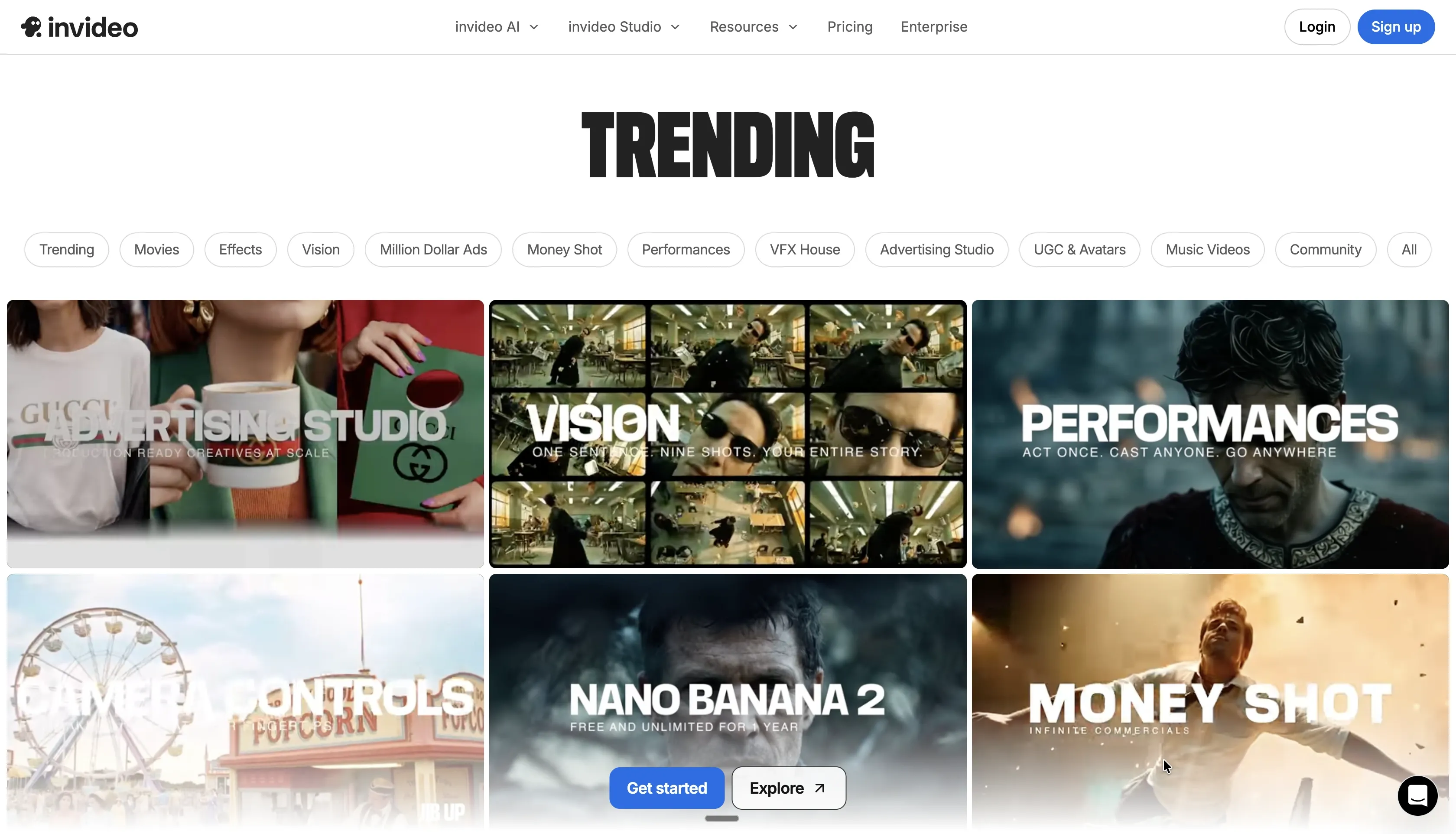
Generative AI: VFX House and Advertising Studio
The 2025-2026 update cycle introduced a separate layer of generative tools beyond basic text-to-video. The VFX House includes Relight (modify scene lighting after generation), Prop Swap (replace objects in footage), and AI Colorist (apply film-grade color grading). These are not novelties, for social ads and product content, they allow a level of post-production polish that previously required dedicated tools like DaVinci Resolve.
The Advertising Studio is aimed at performance marketers: a Logo Designer, Packshot 360 for product mockups, and a dedicated Amazon A+ content generator. The Music Video studio and longer-form Movie mode round out the offering. The community gallery shows real user outputs, search "Mercedes promo" in the InVideo community section to see what the platform is capable of at the high end.
UGC Avatars
InVideo offers a library of AI human actors for UGC-style talking-head videos, the format that consistently outperforms polished ads on TikTok and Instagram. You can also create an AI Twin from your own footage. Lip-syncing works well for wide and mid shots; close-up shots occasionally show a slight drift. For mobile-viewed social content, the quality is more than adequate. For a flagship brand campaign, you would want a human.
Team Collaboration
Multiplayer editing allows team members to work in the same project simultaneously, see live changes, and leave comments on the timeline. The feature works cleanly, no noticeable lag, changes sync in under a second. For small teams passing videos back and forth via WeTransfer or Slack, this alone is worth the upgrade from free.
What Testing Actually Revealed
The AI's default judgment on pacing and music selection is genuinely good for a first pass. A prompt about productivity software produced a video with appropriate corporate-but-not-boring music, footage of people working on laptops in well-lit offices, and a clear voiceover. Without any editing, it was 70% of the way to publishable.
Where it required work: the AI-generated script was serviceable but not sharp. It wrote in a safe, slightly generic register, the kind of copy that sounds like every other explainer video. For any video where the writing matters (ads, explainers, sales content), treat the AI script as a rough draft to rewrite, not a finished product. The footage selection occasionally missed on abstract or B2B concepts, "team synergy" pulled in a lot of people clapping in conference rooms.
The voice cloning test was the standout result. A 30-second casual phone recording produced a clone that held up through a full 2-minute explainer without obvious artificiality. That is a genuinely useful feature for anyone building a content channel.
The text command editing worked about 75% of the time without needing a retry. "Delete scene 2" and "add captions" were reliable. "Make the voiceover sound more excited" produced inconsistent results across tests. The timeline editor is a reliable fallback, it is not as fast as text commands, but it gives you the control you need when the AI interpretation misses.
Tip: Set up your brand kit before you run your first prompt. Colors, fonts, and logo carry through automatically, and retrofitting them after generation requires re-running the video.
What InVideo AI Does Well
- Speed that compounds. From prompt to shareable first draft in under 10 minutes for short-form content. The real value is not one video, it is what happens when a team can produce five in the time they used to spend on one.
- Genuinely beginner-accessible. No timeline editing knowledge required to get something usable. The AI handles 80% of the production decisions. A first-time user can publish a competent video on day one.
- Voice quality in 2026. Premium AI voices on conversational scripts are now difficult to distinguish from human narration in casual listening. That was not true two years ago.
- Multilingual output. 50+ languages with auto-translated voiceovers and subtitles is rare and genuinely valuable for teams targeting non-English markets. The alternative, finding and booking voice actors per language, is slow and expensive.
- Voice cloning. Up to 5 clones on the Max plan. The feature works reliably and is a real differentiator for brand consistency across a content calendar.
- Sora 2 and VEO 3.1 access. Getting both models for $25-100/month versus $450+/month standalone represents substantial value for anyone who needs generative video footage.
- Template depth. 10,000+ templates across a wide range of formats means most users have a credible starting point without building from scratch.
Where InVideo Falls Short
- AI precision is inconsistent. Text commands work most of the time but not all of the time. Some edits require multiple attempts or a manual workaround in the timeline editor. This is improving with each update, but it is still a real friction point.
- The generated scripts are generic. The AI writes competent, safe copy. It rarely writes good copy. For any video where the writing is the point, ads, brand storytelling, sales content, you need to write or significantly rewrite the script yourself.
- No rollover on AI minutes. Minutes reset monthly and do not carry over. A heavy production month followed by a quiet one means you are paying for capacity you cannot bank. This is a meaningful cost consideration for variable-output teams.
- Pricing climbs for serious use. The free plan is genuinely limited (2 AI minutes/week, watermarked exports). The jump to Plus at $25-28/month is reasonable for regular creators. Max at $48-60/month requires honest assessment of whether you are generating enough to justify it.
- Limited advanced editing. If you need frame-precise control, complex motion graphics, or deep color grading, InVideo is not the right tool. It is optimized for speed, not surgical control.
- Avatar lip-sync still imperfect. Close-up shots can drift. Adequate for casual social content; not suitable for a high-production brand video.
- AI subtitles are InVideo-only. You cannot import externally produced footage and apply InVideo's subtitle pipeline to it. A frustrating constraint for hybrid workflows.
Who Should (and Should Not) Use InVideo AI
It is the right tool if you are:
- A social media manager or content team publishing video consistently across multiple platforms. The speed advantage compounds with volume.
- A performance marketer testing multiple ad creative variants. Spinning up five video variants for A/B testing is now an afternoon's work, not a multi-day shoot.
- A course creator or educator who needs explainer videos, module introductions, and summary content without building a production setup.
- A small business owner who cannot afford a video agency and does not have time to learn Premiere Pro. InVideo's output is professional enough for most business use cases.
- A YouTube or TikTok creator building a faceless channel. UGC avatars, AI voiceover, and auto-subtitles cover the workflow end to end.
- An agency managing multiple brands. Voice cloning, brand kits, and team collaboration make handling several clients from one account practical.
It is not the right tool if you are:
- A professional video editor who needs frame-precise control or complex motion graphics. Use Adobe Premiere or After Effects.
- A brand with strict visual identity standards where "close" is not close enough. The AI will approximate your brand, not match it perfectly.
- A casual user who needs two or three videos per month. At $25-48/month, the economics only work if you are creating consistently enough to justify the subscription.
- Someone who needs to process pre-existing footage. InVideo's AI pipeline applies to content generated within the platform. External footage support is limited.
How InVideo Compares to Alternatives
The AI video landscape shifted meaningfully in 2025. Here is an honest comparison of where each tool sits:
Tool | Core Strength | Starting Price | vs InVideo |
|---|---|---|---|
Pictory | Blog/article-to-video. Paste a URL, get a video. | $19/mo | Better for content repurposing. Narrower creative control, smaller library. |
Lumen5 | Clean, brand-focused templates. Strong for LinkedIn. | $29/mo | More polished defaults. Less generative AI depth. |
Synthesia | 230+ AI avatars, 140 languages. Enterprise-grade. | $22/mo | Best dedicated avatar platform. No full video generation pipeline or stock library. |
Zebracat | Streamlined faceless video with built-in analytics. | $20/mo | Simpler and more focused. Narrower template and asset library. |
Runway ML | Best standalone AI video generation (Gen-3 Alpha). | $12/mo | Cinematic quality raw footage. No editing pipeline, no templates, build it yourself. |
Sora (OpenAI) | World-class generative video quality via ChatGPT. | $200/mo | Best raw quality. No stock, no templates, no voiceover, generation only. Available inside InVideo plans. |
Best raw quality. No stock, no templates, no voiceover, generation only. Available inside InVideo plans.
The practical takeaway: if you want the fastest path from idea to finished, distributed video, InVideo is the most complete pipeline available. If raw generative footage quality is the priority above everything else, Runway or Sora produce better output but require you to build the editing pipeline yourself. If you only need to repurpose written content into video, Pictory is cheaper and more focused for that specific use case.
Pricing: The Short Version
InVideo runs four tiers: a free plan (limited and watermarked, but useful for evaluation), Plus at around $25/month on annual billing, Max at around $48/month, and a Generative or Premium tier at $96-120/month for heavy generative AI use. A 20% discount applies across all annual plans. Enterprise pricing is available with custom limits.
The most important thing to know about InVideo's pricing is what does not happen: AI minutes do not roll over. Unused minutes expire at the end of each billing month. If your output volume is inconsistent, model your average monthly usage before committing to a plan tier.
Current pricing details are on the InVideo pricing page. Start with the free plan to evaluate output quality before committing.
Final Verdict
InVideo AI is the most complete end-to-end AI video pipeline available for non-professionals and small teams. It is not perfect, AI command precision is still inconsistent, the generated copy is safe rather than sharp, and the pricing rewards consistent use more than casual use. But what it does, take a prompt and produce a distributable, on-brand video with voiceover, music, captions, and transitions, it now does at a quality level that is genuinely difficult to match with the alternatives.
The voice cloning, multilingual support, and Sora 2 / VEO 3.1 integrations have closed the quality gap meaningfully in 2025-2026. The starting point you get from a well-written prompt now compares favorably to what a junior video editor would produce independently as a first draft. The gap is not fully closed, you still review, refine, and sometimes rewrite, but the baseline is substantially higher than it was twelve months ago.
Score: 8 out of 10. Strong recommendation for high-volume creators, social media teams, and agencies. Test the free plan first, 2 AI minutes per week is enough to see whether the output quality works for your specific use case before committing to a monthly subscription.
Frequently Asked Questions
Is InVideo AI free to use? Yes, there is a free plan with 2 AI minutes per week and 4 exports per week. All free plan exports include a watermark. The free plan is sufficient for evaluating the platform but limited for regular publishing.
Does InVideo AI work for beginners with no editing experience? Yes. The AI handles script writing, footage selection, voiceover, music, and transitions automatically. You can produce a usable first video on day one without prior editing experience. The text command editing interface means you adjust outputs by describing changes in plain language rather than navigating a traditional timeline editor.
Can I use my own voice in InVideo AI? Yes. The voice cloning feature lets you upload a 30-second audio sample to create a cloned version of your voice. Max plan users can store up to 5 voice clones. Clones can be applied to any video generated within InVideo.
What languages does InVideo AI support? InVideo supports 50+ languages for voiceover and subtitles, including auto-translation. You can generate a video in English and switch the voiceover to Spanish, Hindi, French, or another supported language without re-generating the full video.
How does InVideo AI compare to Pictory? | Pictory is optimized for repurposing existing written content, blog posts, articles, scripts, into video. InVideo is a broader platform that generates video from original prompts, includes AI voiceover and voice cloning, has a larger template library, and offers generative AI tools like VFX and avatar creation. Pictory is cheaper for its specific use case; InVideo is more capable for creative video production from scratch.
Do unused AI minutes roll over to the next month? No. AI minutes reset at the start of each billing cycle and do not carry over. If consistent output volume is not guaranteed, factor this into your plan selection.
Is InVideo AI good for YouTube automation? Yes. The combination of AI script writing, AI voiceover (or voice cloning), auto-subtitles, UGC avatars, and a large stock library covers the full faceless YouTube workflow. Several users report monetizing channels within two months of using InVideo for consistent output.
What is the difference between InVideo AI and InVideo Studio? InVideo AI generates full videos from a text prompt, it handles script, footage, voiceover, and editing automatically. InVideo Studio is a traditional template-based editor where you build videos manually from templates, with more granular control over every element. Both are available on the same account. Most users start in InVideo AI and drop into Studio for fine adjustments that require manual precision.
Sources
- Invideo Becomes OpenAI's First Official Partner for Sora 2 (PR Newswire, Oct 2025)
- ChatGPT Pricing, OpenAI (Pro tier at $200/month, includes Sora)
- Google AI plans, Google One (AI Ultra with Veo, $249.99/month)
- Invideo company profile, funding and user metrics (Tracxn)
- Synthesia pricing (230+ avatars, 140+ languages)
- Runway AI pricing (from $12/month)
Keep reading
The archive →11 AI Tools Content Creators Actually Use
A practical rundown of the 11 AI tools content creators actually use day to day, from scripting to video and image generation.
AI TOOLSAI vs. Automation
Artificial Intelligence (AI) and Automation are transformative technologies often used interchangeably but serve distinct purposes. Automation excels at executing repetitive, rule-based tasks efficiently.
AI TOOLSThe Future of Workflow Automation and AI in the World of Business
AI is more than a productivity tool designed to handle tedious tasks; it's about augmenting intelligent workflows. As AI continues to evolve, a critical question arises: is it a game changer?
From The Cut
All takes →- OpenAI vs Anthropic in 2026: Which Company Should You Build On?
- Perplexity vs ChatGPT in 2026: Which Wins for Real Research?
- The Best AI Agent Frameworks in 2026: An Operator's Ranking
- The Best AI Agents in 2026: What Actually Ships Work
- The Best AI Apps in 2026: The Ones Actually Worth Your Time
- The Best AI Browser Agents in 2026: What Actually Clicks Through