3 Most Effective AI Tools For Your Vacation Planning

TL;DR
Three AI tools each cover a different slice of trip planning. Tripnotes nails local food and drink picks and pins them on a map but only handles two cities. Vacay builds curated, experiential itineraries you can book, though it has no real-time data. ChatGPT with Kayak or Expedia plugins is the most capable end-to-end planner, but it hallucinates, so you fact-check everything.
Briefly, here are the 3 most effective AI tools you can use for your vacation planning:
- Use Tripnotes for the best places to enjoy local food and drinks, based on critics’ reviews
- For a pre-built itineraries and experiential trip, use Vacay Chatbot as your planner
- ChatGPT can be leveraged as your trip planner assistant for an end-to-end itinerary
AI tools are invading every aspect of our life and travel is not far behind. A Forbes Advisor study suggested that about 38% of consumers are considering AI to plan their travel itineraries.
Read: How you can use an AI trip planner for your next vacation
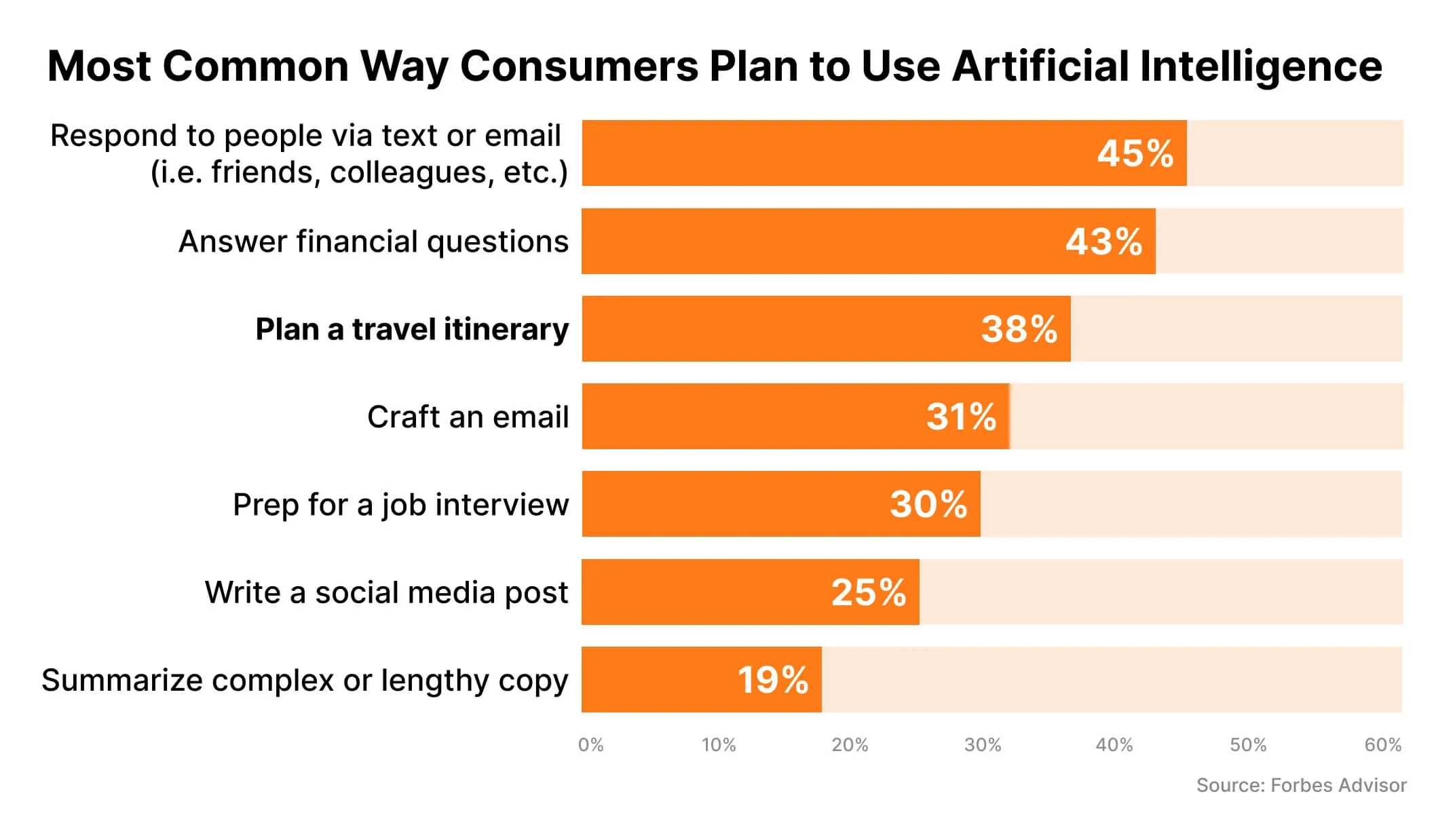
And while AI still can’t replace human research that would offer a truly-personal vacation, it can present a clear lay of the land – popular attractions, restaurants, flights, hotels, and rentals – saving you at least a week of planning time.
So, what AI tools can you use to plan your next vacation?
3 AI trip planner tools at a glance
There are several AI travel planning tools and AI chatbots available that can assist you, however, we found these tools to be the most effective. They were handpicked based on:
- Search engine visibility
- Ease of navigation and simplicity of the user interface
- Accuracy of the responses (cross-checked with a quick Google search)
- Customer reviews on public platforms
We’ll look at these tools in detail below, but here is a quick overview.
Tripnotes | Vacay | ChatGPT | |
|---|---|---|---|
Ease of use | Provides pre-built prompts related to the destination you would enter | Has dedicated space for different features such as Vacay Chatbot, Itinerary Builder, and Thematic Advisors | Easy and simple. It stacks all your conversations for easy access chronologically |
Real-time information | No | No | Yes (with Plus Account) |
Integration to Maps | Yes | No | No |
Mobile app | Not yet launched | No | Both - Android and iOS |
Degree of customization | Low | Medium-to-high | High |
Direct bookings: Can it make direct bookings for flights, hotels, or tours? | No | Limited to the itineraries and tours in its database | No. But provides URLs for booking on suitable apps or website |
Multi-city: Can it plan a multi-city daily itinerary? | No | Yes | Yes |
Preferences: Can it plan itineraries customized to preference such as budget, type of travel? | No | Yes | Yes |
Family trip: Can it customize an itinerary for a family trip or a trip with kids? | To an extent | Yes | Yes |
Tourist attractions: Can it suggest an itinerary aligned with museum, park, tourist attractions, or restaurant open time? | No | Yes | Yes - but is advisable to confirm timings |
Local festival: Are local events and festivals taken into account? | Limited | Limited | Yes - when prompted, but it is advisable to confirm through search engine |
Off-the-beaten path: Can it suggest off-the-beaten-path attractions? | Yes | Yes | Yes |
Public transport: Can it recommend accurate public transport information? | No | No | Limited |
Language: Can it provide local phrases or communication tips? | No | No | Yes |
Weather updates: Does the tool provide real-time weather updates? | No | No | Yes - but requires the right plugin to be activated |
Currency conversion: Does the tool provide currency conversion rates? | No | No | Yes - but requires validation |
Map integration: Can it tag the places suggested in the itinerary on a map? | Yes | No | No |
Validated suggestion: Does it take reviews shared by travelers while suggesting itineraries? | Yes | No | Only when directed through prompts |
Dietary preferences: Does the tool offer restaurant recommendations based on dietary restrictions or preferences? | Yes | Limited | Yes |
Save and share: Can I save, edit, and share my itinerary? | Yes | Yes | Yes |
Free version | Yes | Yes | Yes |
Paid plan | N/Account | $9.99 per month - available only for the US region | $20 per month - needed to access Plugins and GPT-4 model |
Other AI travel planning assistant tools that you could consider are Trip Planner AI, Tripper, Roam Around, and iplan.ai. Let’s look at 3 of these AI travel assistant tools in detail.
Tripnotes: Your go-to drinks & meal planner
Who is this for: Planning for a short trip
Key features:
- Provides an excellent opportunity to explore places and indulge in local-themed culinary experiences.
- Marks the suggested places on a map with relevant icons.
- It aggregates reviews from social media platforms such as Instagram and TikTok, as well as insights from renowned critics and publications while making recommendations. Based on this, it highlights a 'must-try dish' for each location, giving travelers an immersive experience with local flavors.
Key limitations:
- Lacks personalization and can provide suggestions only for 2 cities at a time.
- When asked for an itinerary over an extended period of time - say a month - it would start glitching and the plans would be as organized as for a short trip.
Hidden tip: Instead of selecting the country, select a city you wish to visit. It will provide more personalized suggestions city-wise than country-wise.
Steps to follow while creating itinerary with Tripnotes
Vacay Chatbot: Your curated trip planner
Who is this for: Experiential travelers
Key features:
- Provides pre-built itineraries for worldwide destinations that you can customize
- You can directly book the experiences through them.
- Offers 3 different AI assistants to help with your specific needs:
- Vacay Chatbot works on the GPT model similar to ChatGPT
- Thematic Advisor assists with curated vacations based on specific experiences like luxury travel, solo travel, family travel, wellness & retreat, etc.
- Itinerary Planner can build an itinerary based on your responses to its questions
Key limitation: Suggestions are limited to its database as it doesn’t have access to real-time updates. Also, it can only be used through a web browser.
Hidden tip: Use a combination of both the Vacay Chatbot and the Itinerary Planner to craft a comprehensive itinerary that includes budget allocation. This way you can get tailored accommodation options that align with your budget and suit the needs of your travel group.
Vacay Chatbot allows trip planning in 3 different ways as illustrated below
ChatGPT & ChatGPT Plugins like Kayak, Expedia: Trip planner assistant
Who is this for: End-to-end trip planners.
Key features:
- By far, ChatGPT plugins are the most evolved AI travel tools on this list. It can help you by suggesting a destination, researching and finalizing an itinerary (personalized to your needs), creating a packing list based on your itinerary, and even looking up flights/hotels.
- ChatGPT plugins like Kayak, Expedia can give you updates on flight, hotel, and even car rentals. It can filter for specific budgets, ratings, and your travel tastes (boutique hotel, hostel, 5-star hotel), based on their historical data. To complete the bookings, you’ll be directed to the respective app. Here’s how ChatGPT Plugins work.
Key limitations:
- You can access real-time updates and these plugins only with a ChatGPT Plus account.
- ChatGPT’s responses are dependent on how precise your prompts are. If your prompts are vague, the information might not be accurate and it can often hallucinate.
- You can either activate the Kayak plugin or the Expedia plugin in a single conversation, not both. Therefore you can’t compare and look for cheaper options on booking sites through ChatGPT.
Hidden tips:
- ChatGPT can be accessed through Bing Search and you can plan your itinerary with real-time updates.
- Engage with it. The more you converse, the more personalized results you’re bound to get. Activate Web Requests plugin for external search.
- You can use the Zapier plugin to transfer your itinerary and packing-list to Google Spreadsheet automatically.
ChatGPT plugins assist in planning and direct you to appropriate apps for booking
What should you do?
Ideally, any user would like an app that fulfills their needs at every stage of the trip. Coincidentally, a Statista study reflected the same opinion of travelers across the globe.
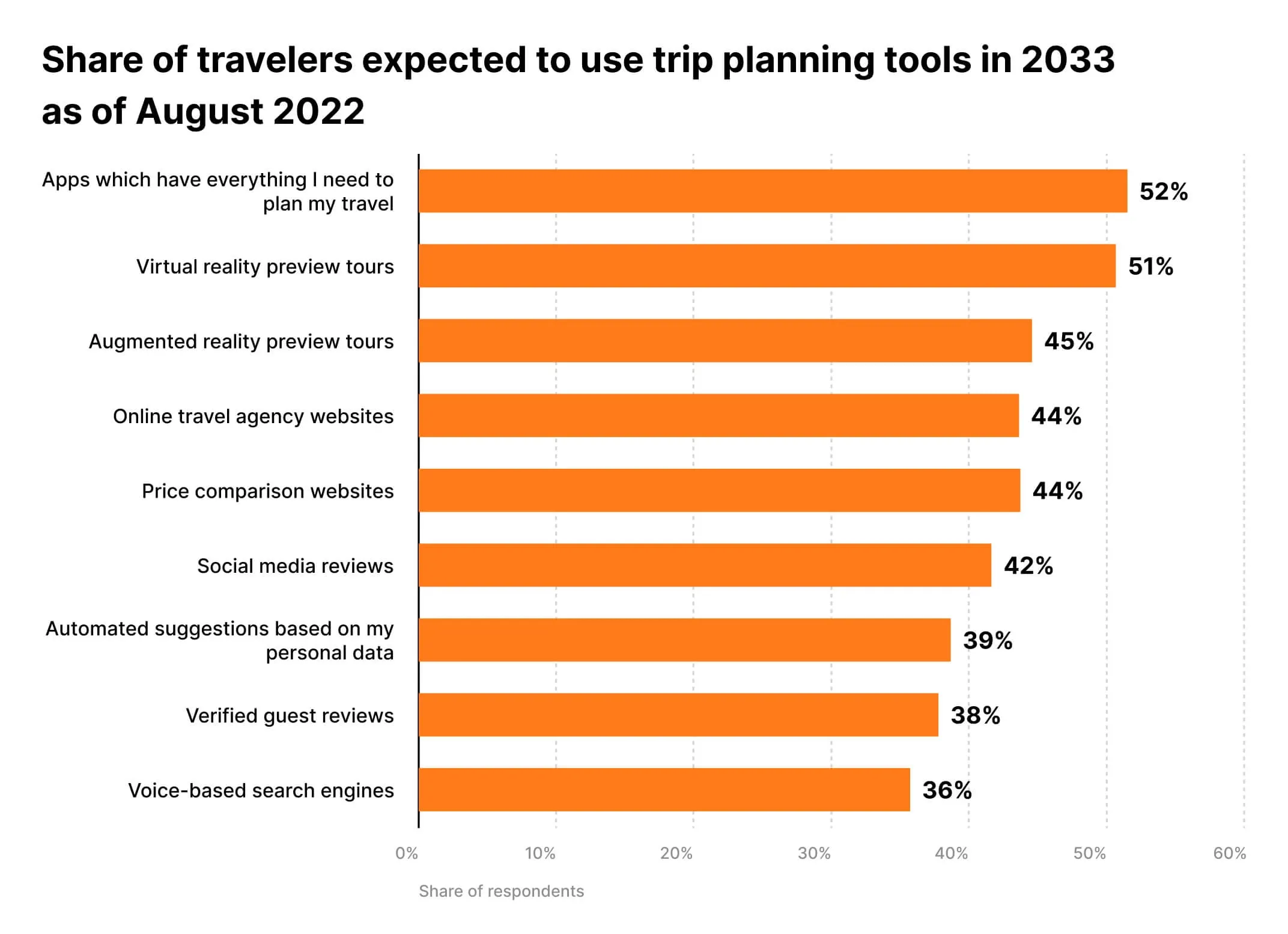
Until such an app exists, here is how you can plan your trip:
For the research and planning phase: Use ChatGPT, Google search, and maybe one more tool from the list above to create the itinerary. If you are looking for a specific experience, consider the following:
- Experience-based trip: Vacay and Trip Planner AI
- Interactive visual mapping of your itinerary: Tripnotes and iplan.ai
- Personalized family trips: ChatGPT and Vacay
For the preparation phase: Ask ChatGPT to help you create a list of packing essentials based on your itinerary and travel dates, which you can then transfer to apps like Evernote or other note-taking apps.
You might consider TripIt to save your flight tickets, boarding passes, and hotel reservations in one place.
During the trip: While travelling, if you need any real-time suggestions to deal with delays, weather conditions, or tour cancellations, consult ChatGPT or Tripnotes for quick solutions.
Don't leave just yet. There's one last thing you need to know before using AI travel assistants for your vacation planning. As with any tool or platform, be cautious with the information you share on the tool or app. Since they are still evolving, there are risks involved when it comes to data privacy and accuracy of information. Here are some risks of using AI tools for travel. While human intuition and insider recommendations, such as tips on securing early-bird tickets or discovering uncharted waterfalls, are irreplaceable, AI tools like ChatGPT can significantly streamline your research and organize your bucket-list for the trip.
So, are you going to use AI for your next vacation?
Let us know about your experience of using an AI travel assistant.
Frequently Asked Questions
Which is the best AI tool for vacation planning?
There isn't one winner yet, because each tool covers a different job. ChatGPT with the Kayak or Expedia plugins is the strongest end-to-end planner for full itineraries and flight or hotel lookups, Vacay is best for curated experiential trips you can book, and Tripnotes wins for local food and drink picks mapped by location. The realistic move is to combine two of them plus a quick Google search.
Can these AI tools book my flights and hotels directly?
Mostly not. Tripnotes and ChatGPT don't complete bookings themselves, though ChatGPT plugins like Kayak and Expedia will point you to the right app or site to finish the transaction. Vacay can book the specific experiences and tours sitting in its own database, but nothing broader. Plan to close out the actual booking yourself.
Do AI travel planners give real-time information?
Tripnotes and Vacay do not, since both pull from fixed databases with no live updates. ChatGPT can surface real-time flight, hotel, and weather data, but only on a Plus account with the right plugins activated. Even then, confirm timings and prices on the actual travel site before you rely on them.
What do Tripnotes, Vacay, and ChatGPT cost?
Tripnotes is free with no paid tier listed. Vacay has a free version, with a paid plan at $9.99 per month that is only available in the US. ChatGPT's $20 per month Plus plan is what unlocks the GPT-4 model and the plugins like Kayak and Expedia that make it useful for travel.
Are AI vacation planners accurate, or do they make things up?
They can make things up, so accuracy depends on you. ChatGPT in particular hallucinates when your prompts are vague and can return outdated timings or prices, which is why confirming festivals, hours, and currency rates through a search engine is advised. Use these tools to organize the research, then fact-check the details that matter before booking.
Sources
Keep reading
The archive →11 AI Tools Content Creators Actually Use
A practical rundown of the 11 AI tools content creators actually use day to day, from scripting to video and image generation.
AI TOOLSInVideo AI Review (2026): Is It Actually Worth It?
Hands-on 2026 review of InVideo AI covering features, pricing, and real performance. Learn how its text-to-video generation, AI voiceovers, voice cloning, and Sora 2 and VEO integration perform in practice.
AI TOOLSAI vs. Automation
Artificial Intelligence (AI) and Automation are transformative technologies often used interchangeably but serve distinct purposes. Automation excels at executing repetitive, rule-based tasks efficiently.
From The Cut
All takes →- Best AI for Writing in 2026: The Honest Operator Ranking
- Best Free AI Tools in 2026: What You Can Actually Build Without Paying
- ChatGPT API Pricing in 2026: What You'll Actually Pay (And How to Halve It)
- ChatGPT Pro vs Plus in 2026: Is the Higher Tier Actually Worth It?
- ChatGPT vs Gemini in 2026: Which One Should You Actually Pay For?
- Claude API Pricing in 2026: What You'll Actually Pay (And How to Cut It in Half)