Midjourney AI Art Generator: Transforming Text into Visual Wonders
TL;DR
Midjourney is an AI art generator that turns text prompts into images using neural networks. You drive it with the /imagine command, either inside its Discord server or on the web app, and it returns four variations per prompt. Version 6 sharpened prompt accuracy, added basic in-image text, and upgraded the upscaler. It runs on paid tiered subscriptions (Basic, Standard, Pro, Mega), with no consistent free trial.
Midjourney, a cutting-edge AI art generator, is at the forefront of visual creation using neural networks. This technology, mirroring the human brain, adapts and learns to produce diverse visual art forms from textual prompts. Its integration with Discord highlights a community-focused approach, making it a popular tool for both artists and hobbyists.
Technology and Popularity
Built on advanced neural networks, Midjourney mimics human brain processes to interpret and visualize complex prompts. Its popularity has soared, which is evident due to the vibrant communities and wide range of generated artworks.
Key Features and How to Use Midjourney
- Image Description and Interpretation: Known for its nuanced interpretation of text prompts, Midjourney can create detailed, emotive visuals.
- Consistent Character Visualization: It's adept at creating recognizable characters, crucial for branding and storytelling.
- Diverse Artistic Outputs: Capable of producing everything from hyperrealistic to surrealistic images.
- Limitations: Struggles with text rendering within images.
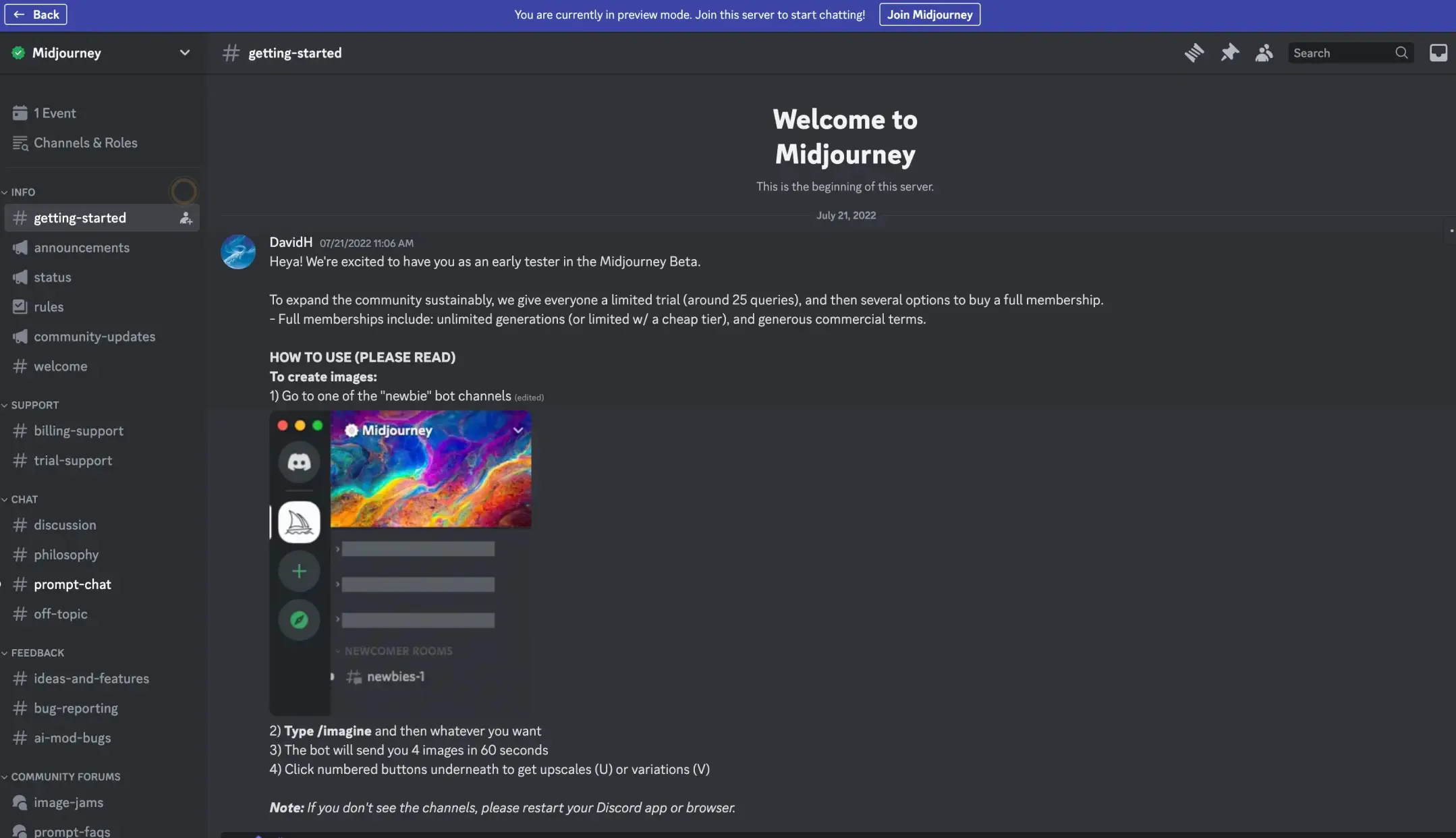
- Quick Start Guide: Sign up on Discord, join the Midjourney server, select a subscription plan, and begin creating with the “/imagine” command.
Version 6 Update
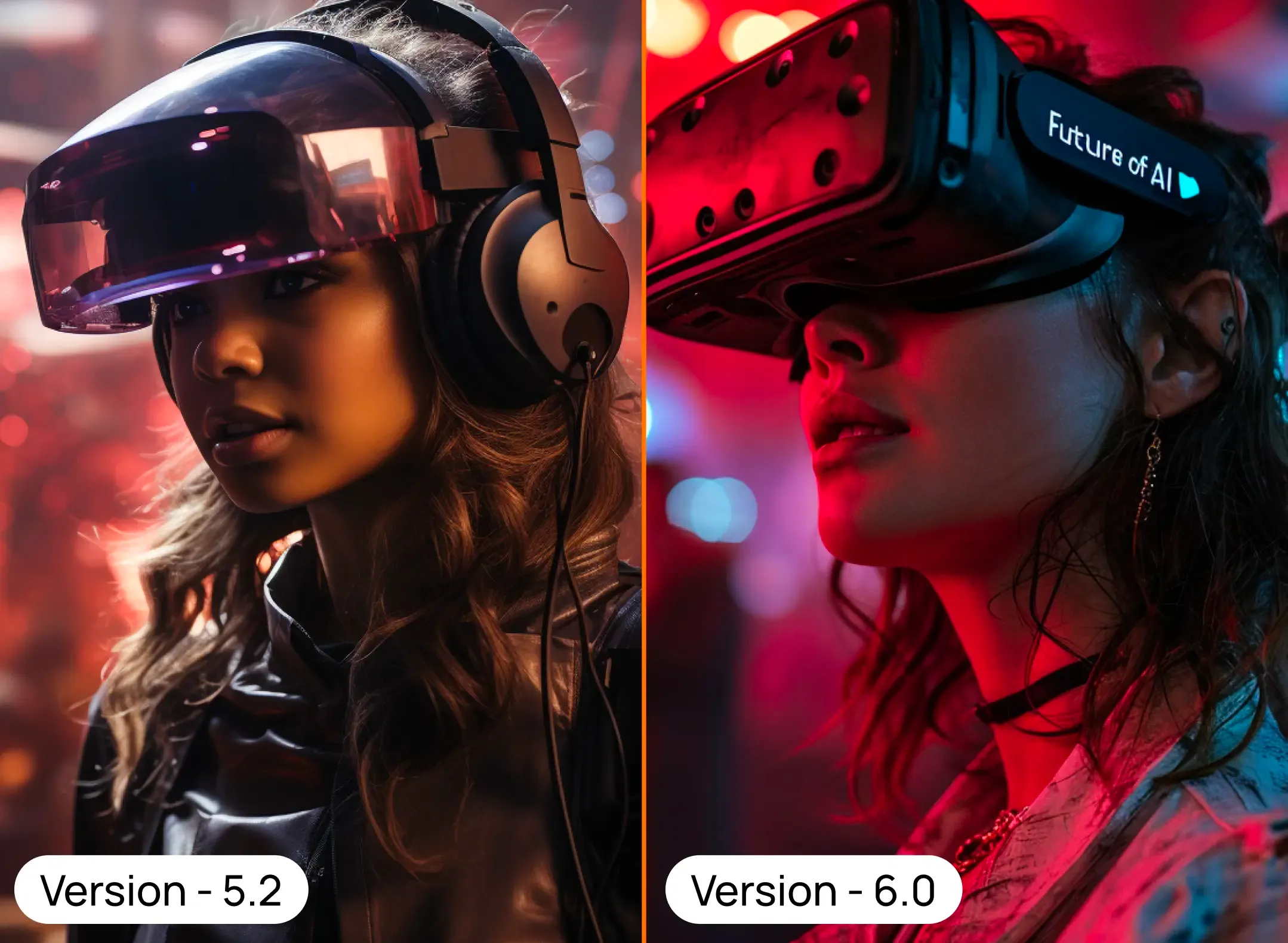
The introduction of Midjourney V6 brings significant advancements:
- Enhanced Prompt Accuracy: V6 offers more precise adherence to complex prompts.
- Improved Model Knowledge: Greater coherence and understanding in image generation.
- Text Drawing Capabilities: Includes minor text within images.
- Upgraded Upscaler: Enhanced image quality and details.
Prompting with V6 differs notably from earlier versions, emphasizing sensitivity and explicitness.
Pricing and Community
Midjourney offers a tiered subscription model, accommodating various usage needs. The community aspect is vital, with forums and Discord channels for collaboration and learning.
Advanced Prompting Techniques
Effective prompting is key. Be specific, use descriptive words, and maintain a balance between detail and creative freedom. Explore commands like /imagine, /blend, /describe, /remix, /shorten, and parameters like --ar (aspect ratio), --q (quality), --s (stylization), --no (exclusion of elements), and --iw (image weight control).
Use Cases of Midjourney
Artistic Exploration:
- Realistic or surreal artworks creation
- Artistic style mimicry or imitation
- Abstract concept visualization
Environmental Visualization:
- Generating landscapes and cityscapes
- Architectural visualizations
- Interior design planning
Character and Product Design:
- Character design conceptualization
- Product prototype design
Game and Web Development:
- Isometric game art creation
- Web design visualization
- Pixel art creation
Creative Applications for Business and DIY:
- Logo design
- Book cover design
- Coloring book creation
- Print-on-demand product design
Embark on Your Midjourney Voyage
As we close this comprehensive exploration of Midjourney, remember that this journey into AI-powered artistry is just beginning. Whether you're an artist seeking new horizons, a designer craving innovative tools, or a curious soul ready to dip your toes into AI's creative pool, Midjourney offers a universe of possibilities. Why wait? Join the Midjourney community today, experiment with your first prompt, and share your creations. Let's witness together how your words transform into breathtaking visuals. Ready to embark on your Midjourney voyage? The canvas of imagination awaits you!
Frequently Asked Questions
What is Midjourney and how does it work?
Midjourney is an AI image generator built on neural networks that converts text prompts into visual art. You type a description after the /imagine command, and the model interprets it and returns four image variations, typically within about a minute. It handles everything from hyperrealistic to surreal styles.
How do you start using Midjourney?
Sign up with a Discord or Google account, join the Midjourney server (or use the web app), and pick a subscription plan. Then create images by typing the /imagine command followed by your prompt. There is no consistent free trial, so a paid plan is required to generate images.
What changed in Midjourney V6?
V6, released in December 2023, brought more accurate following of longer and more complex prompts, better overall coherence, and the first ability to render basic legible text inside images. It also shipped an upgraded upscaler with subtle and creative modes. Prompting style shifted too: V6 rewards being more explicit and literal than earlier versions.
How much does Midjourney cost?
Midjourney uses a tiered subscription model with four plans: Basic at $10/month, Standard at $30/month, Pro at $60/month, and Mega at $120/month. Higher tiers add more fast GPU hours and perks like Stealth Mode. Annual billing knocks roughly 20% off each tier.
What can you actually use Midjourney for?
Common use cases include concept art, landscapes and architectural visualization, character and product design, game and web art, and creative business assets like logos, book covers, and print-on-demand designs. Useful commands include /imagine, /blend, /describe, /remix, and /shorten, plus parameters like --ar for aspect ratio, --s for stylization, and --no to exclude elements.
Sources
- Midjourney - Comparing Midjourney Plans (official pricing docs)
- Midjourney - Version (official V6 model docs)
- Midjourney - Discord Quick Start (official /imagine guide)
- VentureBeat - Midjourney V6 is here with in-image text and overhauled prompting
- Wikipedia - Midjourney (neural networks, V6 release, text rendering)
Keep reading
The archive →Adobe Firefly: Transforming Design with AI Powered Precision
Explore Adobe Firefly, the revolutionary AI tool for creators. This guide delves into its Adobe suite integration, uses, and standout features such as Generative Fill and sophisticated photo options. Perfect for high-quality images and professional design, discover how Firefly transforms creative processes.
FUTURE OF AIDeep Dream Generator: Mastering AI Artistry - A Full Guide
Explore AI-driven art with Deep Dream Generator. This guide covers its neural network tech, starting steps, features like modifiers, AI models, quality settings, and use cases like digital art and marketing.
FUTURE OF AIHow do AI Content Detectors Work
Unsure. if the content is human-written or AI-generated? Explore the world of AI content detection tools, how they use advanced techniques like analyzing context, language, and even emotional depth to uncover the truth. Learn how AI content detection can help you navigate the ethical and quality landscape of the internet.
From The Cut
All takes →- The Best AI Meeting Note-Takers in 2026: What's Worth the Seat
- The Best AI Presentation Makers in 2026: What Actually Builds a Deck
- The Best AI Productivity Tools in 2026: The Lean Stack That Actually Helps
- The Best AI Project Management Tools in 2026: What Actually Helps Teams Ship
- The Best AI Sales Tools in 2026: What Actually Closes
- The Best AI Scheduling Assistants in 2026: What Actually Protects Your Time